
Why Is My Steam Game Downloading So Slow? 10 Proven Fixes
Why Is My Steam Game Downloading So Slow?
10+ Proven Fixes to Skyrocket Your Download Speed in 2026 – Stop Waiting, Start Gaming!
Common Causes of Slow Steam Downloads
1Overloaded Steam Servers
During sales or big launches, popular regions get congested – speeds drop to 1-5 MB/s.
2Wrong Download Region
Steam auto-selects servers – sometimes far away or busy ones.
3WiFi Instead of Ethernet
Wireless can halve your speed + add packet loss.
4Corrupted Download Cache
Old cache files force constant retries.
10+ Step-by-Step Fixes (Start Here!)
1Restart Steam & Clear Cache
- Steam → Settings → Downloads → Clear Download Cache
- Close completely via Task Manager
- Most common instant 2-5× boost
2Change Download Region
- Settings → Downloads → Download Region
- Try nearby countries or less busy ones
- Many users get 5-10× faster speeds
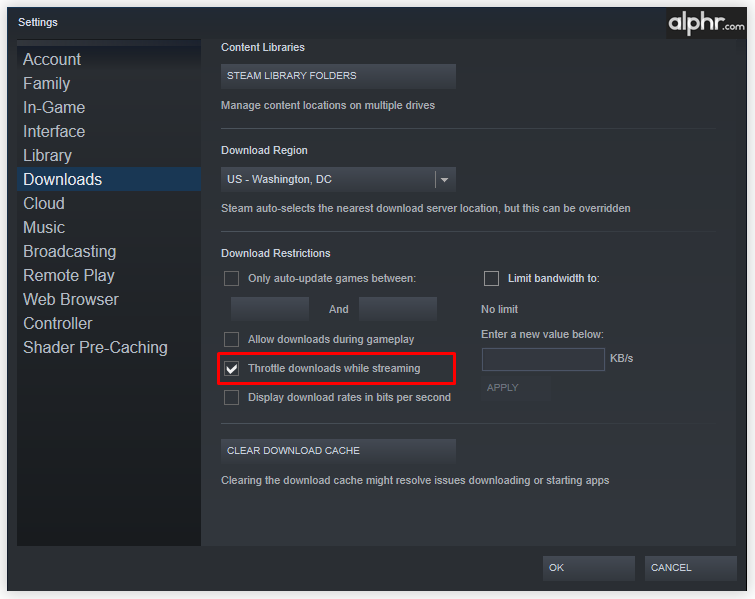
3Remove Bandwidth Limit
Uncheck “Limit bandwidth to” or set to No limit.
4Switch to Ethernet
Use cable instead of WiFi – huge stability boost.


Quick Comparison: Before vs After Fixes
| Fix | Expected Boost | Time Needed |
|---|---|---|
| Clear Cache + Restart | 2-4× | 2 min |
| Change Region | 3-10× | 3 min |
| Ethernet Cable | 2-3× | 5 min |
| Disable Write Caching (SSD) | Up to 5× | 5 min |